Installing the Widget
Getting NanoLog up and running on your platform takes less than two minutes. The widget is designed to be lightweight, asynchronous, and completely isolated from your existing CSS and Javascript so it won't break your site.
Installation Steps
- Log into your NanoLog Dashboard.
- If you haven't already, create a New Project for your application.
- Click on the Integration or Widget Settings tab for your project.
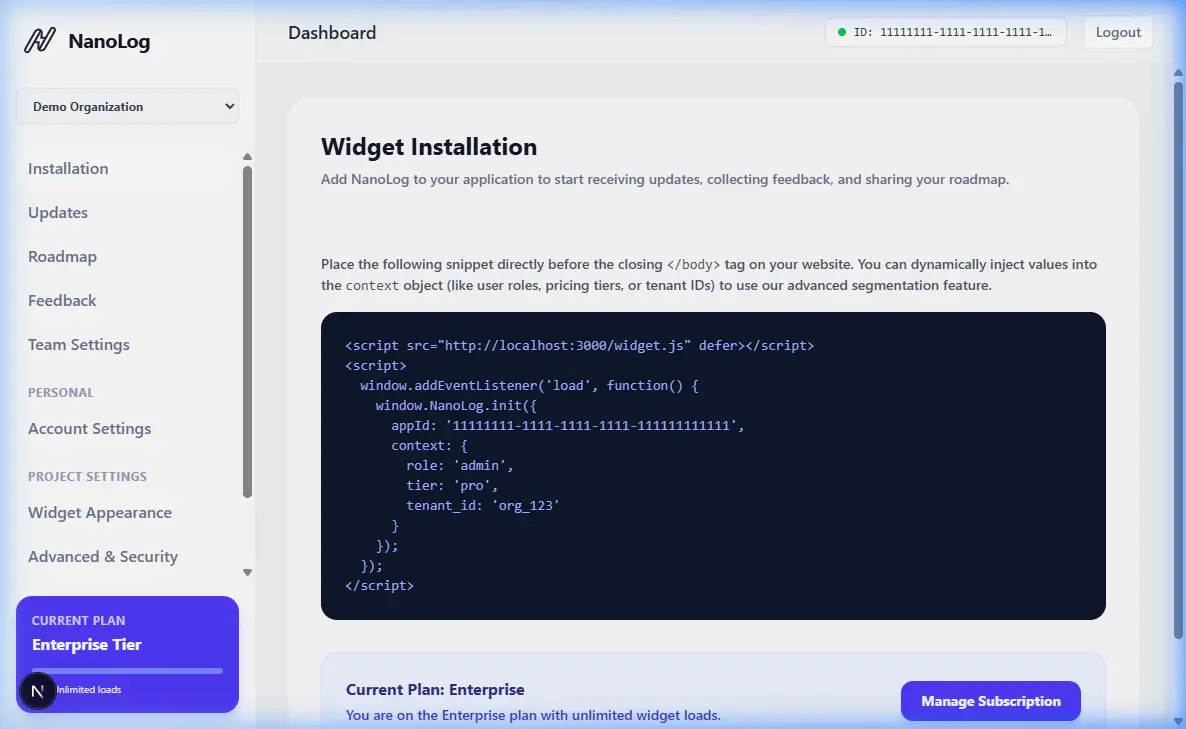
- Copy the provided HTML snippet. It will look something like this:
<script src="https://nanolog.com/widget.js" data-app-id="YOUR_UNIQUE_APP_ID"></script>
<script>
  window.NanoLog = window.NanoLog || {};
  window.NanoLog.init({
    // Optional configuration properties
  });
</script>
- Paste this snippet into the
<head>or just before the closing</body>tag of your application's HTML template.
Security Configuration
To prevent malicious actors from installing your widget on unauthorized websites and eating up your usage quota, you must define Allowed Domains.
- In the Widget Settings, scroll down to the Security section.
- Enter the domain names where the widget is allowed to load (e.g.,
app.yourcompany.com,localhost:3000). - Save the settings. If a request comes from a domain not on this list, the widget will refuse to load the content.
That's it! Your widget is now live and ready to display updates.